10. Weather, season, light and time
Translated from the Finnish manual (manual/fi); the Finnish text is authoritative.
Matches version: 0.6-dev (phase 6, part 2, 2026-10-27). Status: time, sun, season and weather work; the weather changes following the FMI series, trails in snow and propeller ice are modelled.
Scenario time
The flight takes place on the chosen day and time of day. The top edge of the planning map shows the time in Finnish time (EET/EEST automatically) and the sun's elevation and direction at that moment. The time is changed on the planning map:
| Key | Effect |
|---|---|
| + / − | one hour forward / back |
| Page Up / Page Down | one day forward / back |
| Home | the present moment (when you set off to fly the default is today at 12:00, so the exercise starts in daylight) |
| 1 | summer day 21 June at 12:00 |
| 2 | summer night 21 June at 01:00, midnight sun |
| 3 | autumn evening 15 September at 19:30 |
| 4 | autumn dawn 26 October at 07:30 |
| 5 | winter night 15 January at 02:00 |
| 6 | polar-night midday 21 December at 12:00 |
| 7 | spring day 20 March at 11:00 |
The season also shows in the trees: birches and mountain birches come into leaf at the beginning of June, autumn colours peak in mid-September and the leaves fall at the end of September; both cameras can see through a leafless birch. Conifer crowns carry snow while there is snow on the ground, so the crown looks almost as cold as the snow in the thermal image.
From the command line: godot --path . ++ --time=2026-12-21T12:00 (Finnish time).
Full stop (.) fast-forwards mission time 1× → 10× → 60× → 1× while the aircraft is on the ground with the motors stopped: while waiting for the dog party or the ground teams, during a battery change or de-icing. Everything runs at the same pace: the clock and the sun, the weather, snow and trails, the teams and the dogs. Starting the motors returns to real time, and so does a dog finding the missing person. A flight always runs in real time. The bottom line of the HUD shows the scenario clock, the sun's elevation and the fast-forward rate.
Sun
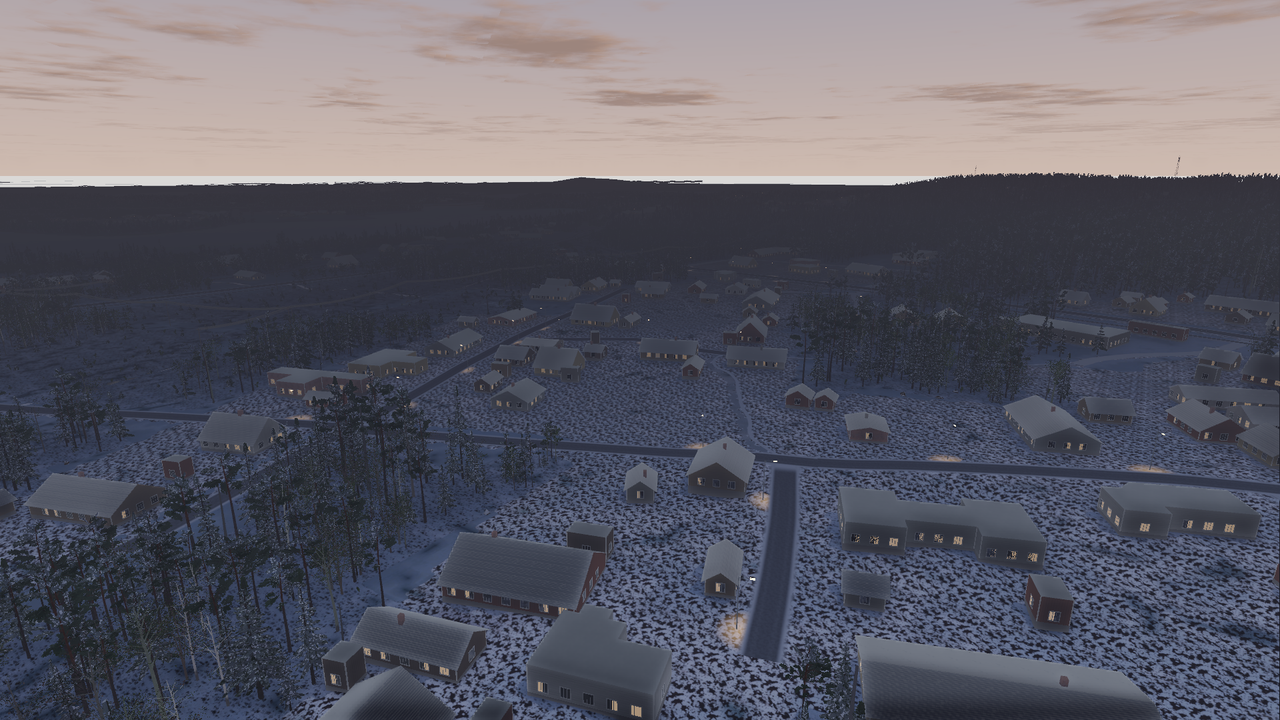
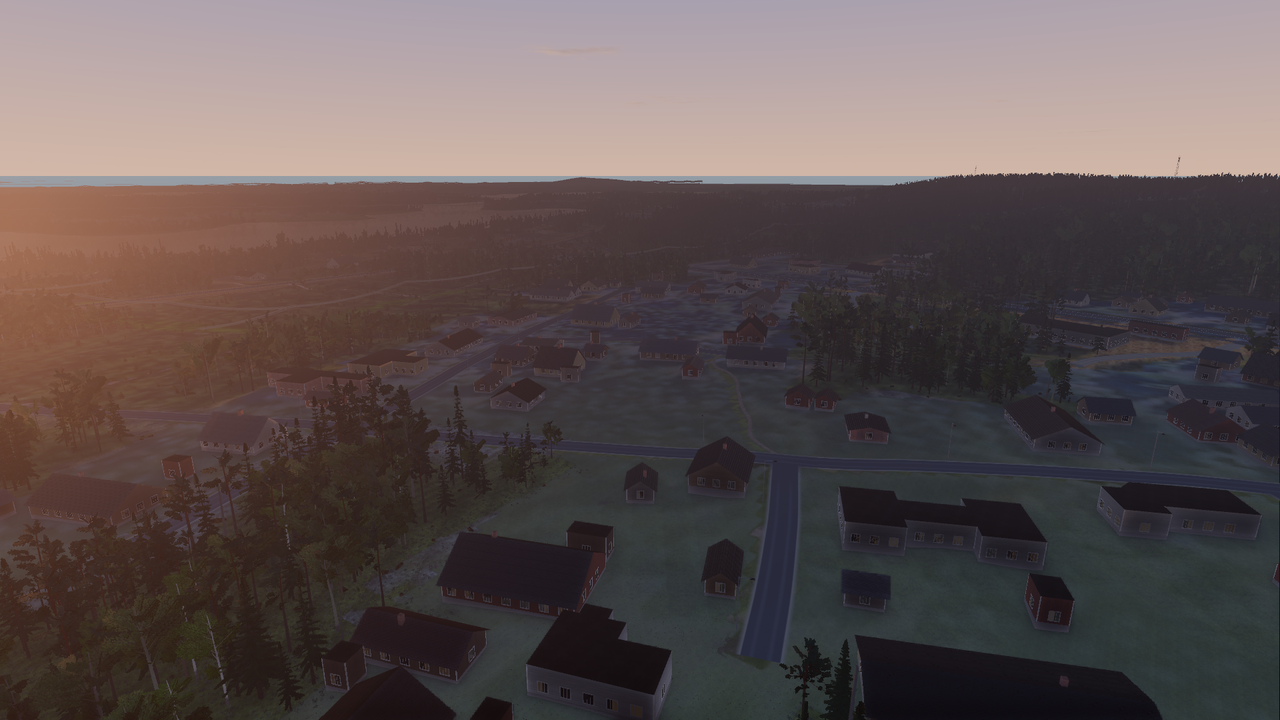
The sun's position is calculated from the date, the time of day and the area's coordinates (the NOAA algorithm, accuracy better than 0.2°, tested against an independent library). The light follows it: the direction and length of shadows, the reddening of a low sun, the blue light of twilight, and night. At Levi's latitude this produces the midnight sun in June and the polar night in December by itself.
The camera adjusts exposure automatically like a real device: polar-night midday (sun at −1°) appears as a bluish but readable twilight; full night stays dark because gain is limited. Moonlight is not modelled yet.
Season (v1)
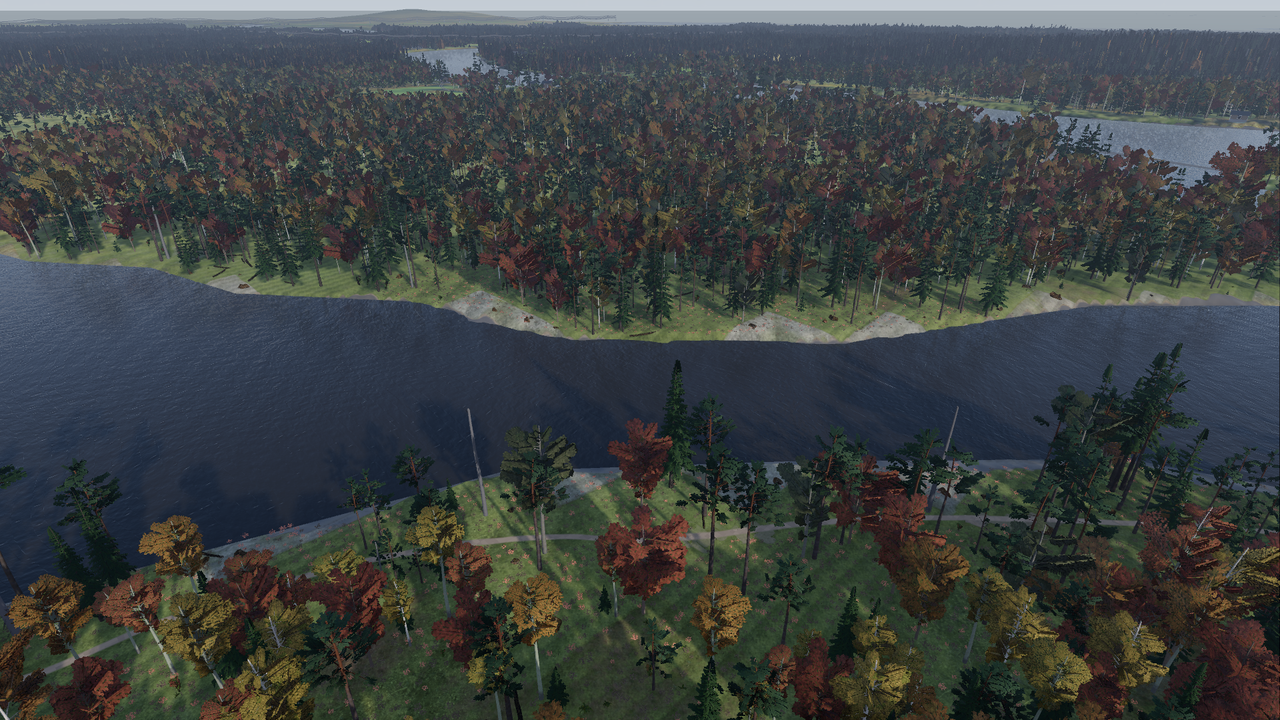
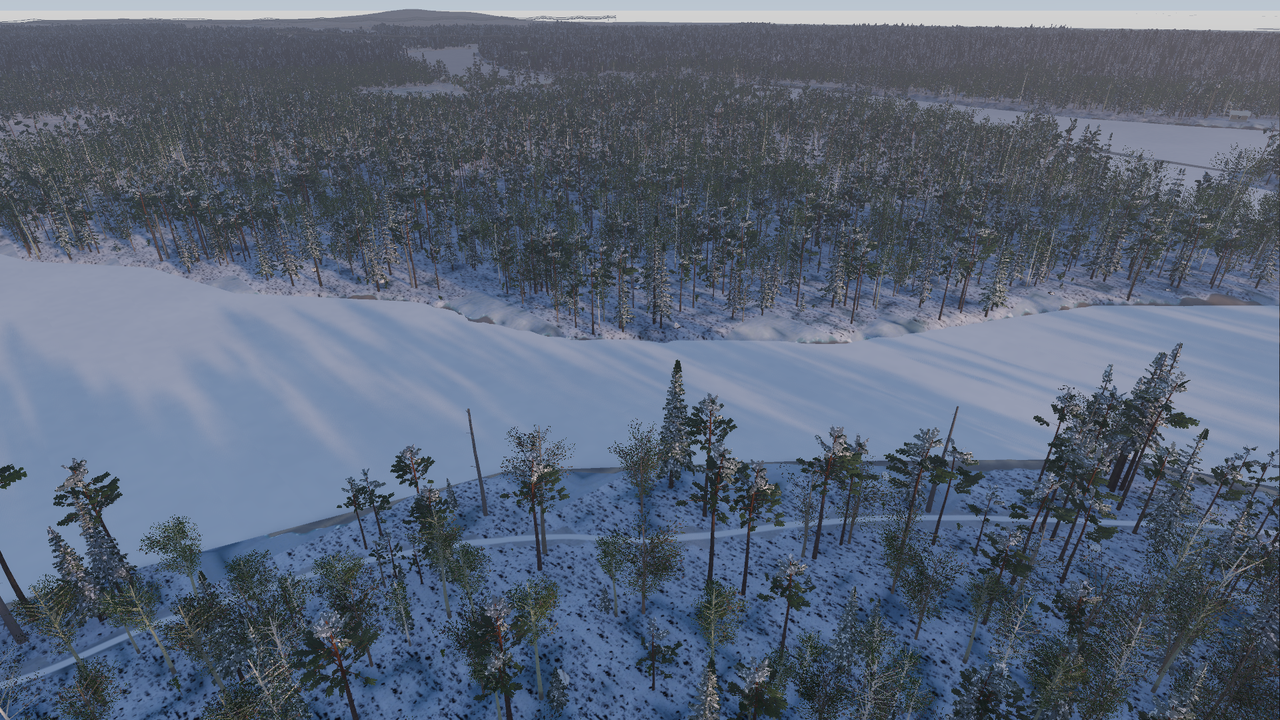
From the date, following the climate of Kittilä, the simulator derives snow cover and its depth, freezing of waters (from November to the end of May), leaves on the trees (from the beginning of June to the end of September) and air temperature (monthly mean ± a daily variation following the sun). The second line of the planning map shows these; the HUD shows the air temperature next to the clock.
The instructor can override the automatic values on the planning map: S cycles the snow state (automatic → forced on → forced off), [ and ] lower and raise the temperature one degree at a time. From the command line: --snow and --no-snow.
Snow shows on the ground surface: a winter version has been computed from the orthophoto, in which open ground is white, lakes and rivers are frozen grey and conifer forest is dark (the snow is on the ground, the canopy looks dark from above). This is an estimate based on colour rules, not terrain data; in phase 3 snow and vegetation will come from the real topographic database. Snow depth and leaflessness do not yet show in the picture, but they are kept in the state for the thermal camera and phase 3.
What is missing
- Partial snow cover (spring and autumn), snow depth in the picture, hoarfrost.
- The effect of temperature on the battery (phase 6) and on the thermal image (next).
- Moon phase and light at night.
Weather (phase 6)
By default the planning map fetches the real weather from the open data of the Finnish Meteorological Institute (FMI) for the chosen place and time: for the past and the present, the observations of the nearest weather station (temperature, wind and gusts, cloud cover, visibility, humidity, precipitation, snow depth); for the next two days, the HARMONIE forecast. The fetch takes a second; the result is shown on the Weather line and saved on the machine, so the same place and hour is not fetched again. There is no forecast more than two days ahead, and then the season model is used.
W switches the source: FMI → manual → season model. In manual mode the instructor adjusts the values: ↑ ↓ wind ±1 m/s, ← → wind direction ±15°, Shift+↑ ↓ cloud cover ±10 %, Shift+← → visibility ×2 / ÷2, N precipitation (0 / 0.5 / 2 / 6 mm/h; snowfall below freezing). The weather is saved in the scenario, passed on to the observers and the instructor, and replayed in coach mode.
What the weather does in flight:
- Wind carries the aircraft: in GPS mode the flight controller compensates for it (the aircraft holds its place up to 15 m/s but uses battery with the wind, and from 8 m/s the ride gets bumpier); in ATTI mode the aircraft drifts. Limits, warnings and flight times: chapter 4. Gusts vary every few seconds. The bottom line of the HUD has a wind arrow relative to the aircraft's nose.
- Cloud cover dims the sun and greys the sky, removes shadows when fully overcast, and in the thermal image the ground warms up less (lower contrast by day, but a cloudy night cools less).
- Visibility is fog: the visible-light picture hazes with distance and thermal contrast fades further away; at 300 m visibility there is no point searching from high up.
- Low ground mist (radiation mist): on a humid, calm and clear night or morning with the sun low, mist gathers in hollows, river valleys and over lakes and fields; ridges and hills stay above it and in the forest it is thinner. It drifts in banks with gaps between them and clears with wind, cloud or the rising sun. The thermal camera sees through it.
- Sleet falls between −0.5 and +1.5 °C: wet grey flakes with some water among them; surfaces get wet.
- Rain and snowfall add haze and eat thermal contrast. In the visible-light cameras it rains (streaks of drops or flakes depending on intensity, carried by the wind); in the thermal camera no flakes are visible, only the contrast fades.
- Rain wets surfaces: evaporation cancels the sun's heating, so roads, rocks and open ground stay close to air temperature and wet clothing is cooler. In rain the thermal image is flat and a person's contrast is lower.
- Wind increases with height: FMI measures at 10 metres; at 100–120 metres the wind is about a third stronger over open ground and about half again as strong over forest. In the air the HUD shows the wind at the aircraft's altitude, on the ground the station value.
The weather changes during the exercise
In FMI mode the whole period is fetched: observations about a day back and the forecast five hours forward from the start of the exercise. The weather follows the series minute by minute (wind, clouds, visibility, precipitation, temperature), so during a long search it may start raining or fog may lift. Manual weather stays constant for the whole exercise.
Trails in snow and fresh snow
The route the missing person walked leaves a trail in the snow that shows in both cameras: in visible light as shadowed depressions, in the thermal image slightly warmer than the surroundings (compacted snow conducts heat from below and its surface is darker). The shape of the trail tells who made it:
- footsteps: alternating left and right depressions about 75 cm apart; in the thermal image they show as warm "breadcrumbs" to the left and right. Fresh footsteps carry body heat for a few minutes.
- skis: two continuous tracks about 20 cm apart, with pole marks now and then along the outer edges.
- dog: small, closely spaced paw prints; the dog moves ahead of the party and zigzags from side to side.
Ground teams and dog parties leave their own trails as they move through their segment (team members side by side about 15 m apart). When a team's trail crosses the missing person's trail, telling which is which is the classic snow-trail confusion. Up close (below about 40 m, or with zoom) individual depressions are visible; from high up the trail merges into a line.
The condition of a trail is calculated from the moment the walker was at that spot up to what is on the screen:
| Weather after the trail was made | How long the trail stays visible |
|---|---|
| frost and calm | 2–7 days |
| snowfall or strong wind (above 5 m/s in frost it drifts loose snow) | from minutes to hours |
| thaw, rain on snow | a very short time |
Fresh snow hides a trail from the eye sooner than from the thermal camera: about a centimetre of new snow fades the trail out of the visible picture, but in the thermal image it still stands out under 3–5 cm. So search for the trail with the thermal camera when the eye can no longer find it.
Snow falling during the exercise also builds up: snow-free ground turns white (only partly in forest, not on open water), and items dropped by the missing person sink under the snow, lose their thermal contrast and finally disappear from view altogether. In manual and season-model modes precipitation starts only at the start of the exercise (a trail made earlier is not buried before the crew is on site); in FMI mode the trail has aged in the real weather.
Propeller ice
Freezing fog (visibility below 1 km), drizzle or rain around zero, and flying at the cloud base build up ice on the propellers. Ice eats power: the battery drains faster (almost twice as fast with 60 % ice), top speed and climb weaken, and with almost fully iced propellers the aircraft can no longer hold its altitude. The simulator warns twice ("high motor load", "not enough lift") — these are the simulator's own messages, not those of the real flight app. The ice comes off above +1 °C or when the propellers are cleaned: land at the launch site, stop the motors and press Y. Cleaning takes one minute, after which the propellers carry anti-icing compound that prevents new ice for 30 minutes (on the ground the HUD shows "ice on the propellers" and the de-icing time). A battery change does not clean the propellers, but both can be done at the same time. There is no cold-battery model: the training aircraft's batteries have heating.
For testing and your own experiments the weather can also be given from the command line: --weather=precip:2,wind:8,vis:800,temp:-4,cloud:1,rh:98 (manual weather).
Source: Finnish Meteorological Institute open data, CC BY 4.0.