9. Finding and marking the person
Translated from the Finnish manual (manual/fi); the Finnish text is authoritative.
Matches version: 0.1-dev (phase 1, 2026-10-26). Status: works in a simple form; the real procedure (interrupting the programme, T mode, descending to check) comes in phase 4.
The person
In this version there is one person in the terrain, lying down, red jacket, dark trousers. For testing, they are 50 m north of the launch site; in later versions the place is drawn according to the profile (chapter 7).
Laser rangefinder (LRF)
The profile's laser rangefinder shows the distance, coordinates and height of the point under the crosshair. In the simulator the same reading is shown in yellow under the crosshair: LRF 312 m N 67° 48.950' E 024° 48.508' 198 m ASL. This way you get the person's coordinates from hundreds of metres away without landing on top of them. L hides and shows the reading. The range is 1200 m, as on the real aircraft.
Marking
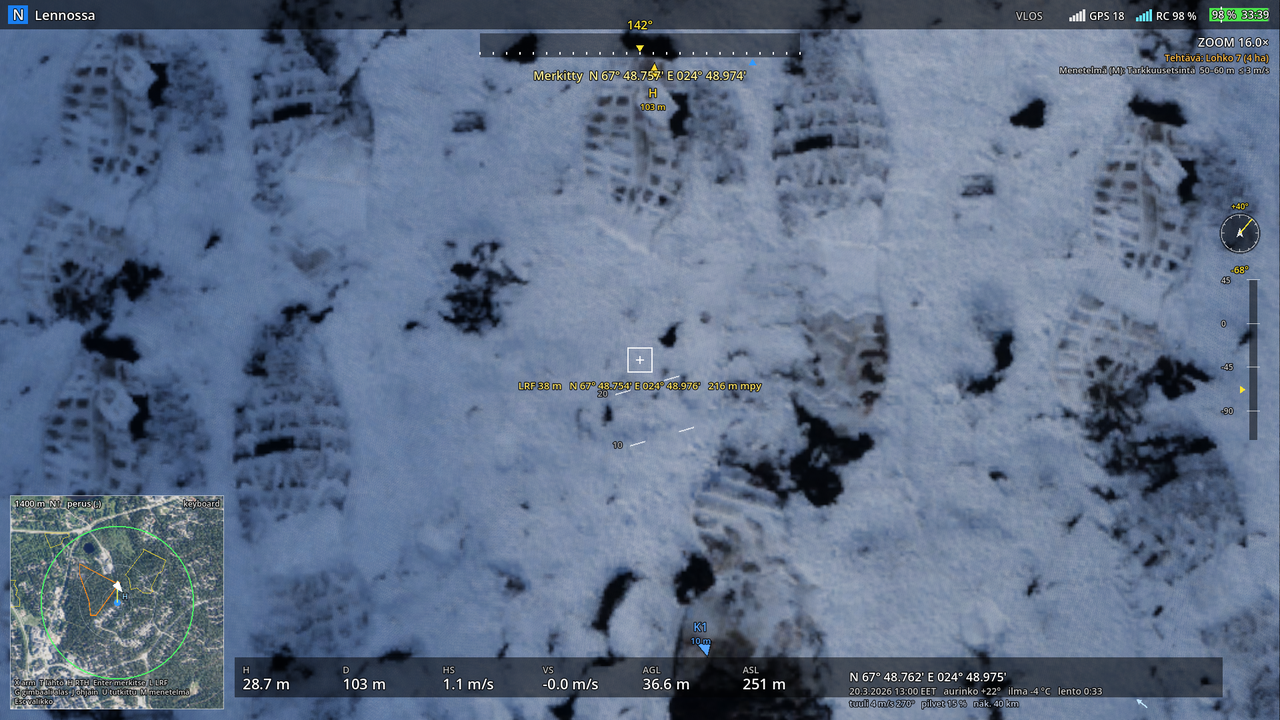
When a suspected person is in the crosshair box, press Enter. The mark is the coordinate of the LRF point, not the aircraft's own position. The simulator computes the ground point under the crosshair and
- if the point is no more than 15 m from the person: PERSON FOUND in green and the coordinates in DDM format; the person appears on the map as a red dot;
- otherwise: Marked and the point's coordinates. Wrong marks stay in the summary, as in a real report.
Marking works from any height, but in real operations the person is checked by descending lower and identifying them before reporting. Do the same in the simulator: in phase 4 the summary will assess it.
Flight track for training use
When the flight ends, a GPX file is saved with the flight track (trkpt every second, height above sea level; the internal log runs at 10 times per second for replay) and, as waypoints, the launch site and every mark (name Merkintä n or KOHDE, i.e. "Mark n" or "PERSON", with a time stamp). The file is written to two places:
Tiedostot(Documents)/Support UAS/lennot/flight-<aika>.gpx(<aika>= time); on a OneDrive- managed computer for exampleOneDrive/Asiakirjat/Support UAS/lennot/;- the game's own folder
%APPDATA%/Godot/app_userdata/Support UAS/logs/together with a.jsonfile that has all the samples (heading, speeds, gimbal, battery) for replay.
The GPX opens in QGIS, Mapitare, Garmin and most map applications, so the flight can be reviewed on a real map after the training. The summary shows the file path.
Report and what follows
In a real mission what follows is: a phone report to the search leader (person found), the aircraft home according to the landing checklist, the nearest party to the spot, first aid. In the simulator the flight ends with Esc in the summary, which shows the find time from take-off and the coordinates.
Finds (phase 4a)
The missing person drops items along the way according to their profile: bucket, cap, glove, backpack, walking stick, pole, beanie, toy. A mark (Enter) on an item logs a find with its coordinates in the log and the GPX ("LÖYDÖS ämpäri", i.e. "find: bucket") and shows it on the HUD. A find is a clue to the route: the missing person has passed there, usually heading away from the IPP. In the thermal camera the item has already cooled to the temperature of its surroundings, so it is found in the visible-light picture.
Reporting a find and the leader's orders
A marked find (Enter at the crosshair, e.g. a glove or a bucket) waits for the report: the HUD reminds Report the find to the search leader (I). I reports the finds (and a marked person) to the leader, and the leader answers:
- the nearest free dog party goes to the find to take the trail; with no dog free, the nearest free ground team goes to check the find's segment,
- the find's segment and the segments near it (300 m) are raised,
- the drone gets three tasks after the current one: a radial sweep 100 m round the find, the exit paths from the segment (at most two paths, tracks or roads nearest the find, 0.3 km out) and then the next segment from the live picture. Report the current task searched (U) to move on.
Debrief (Q from the Esc menu, or when the flight ends)
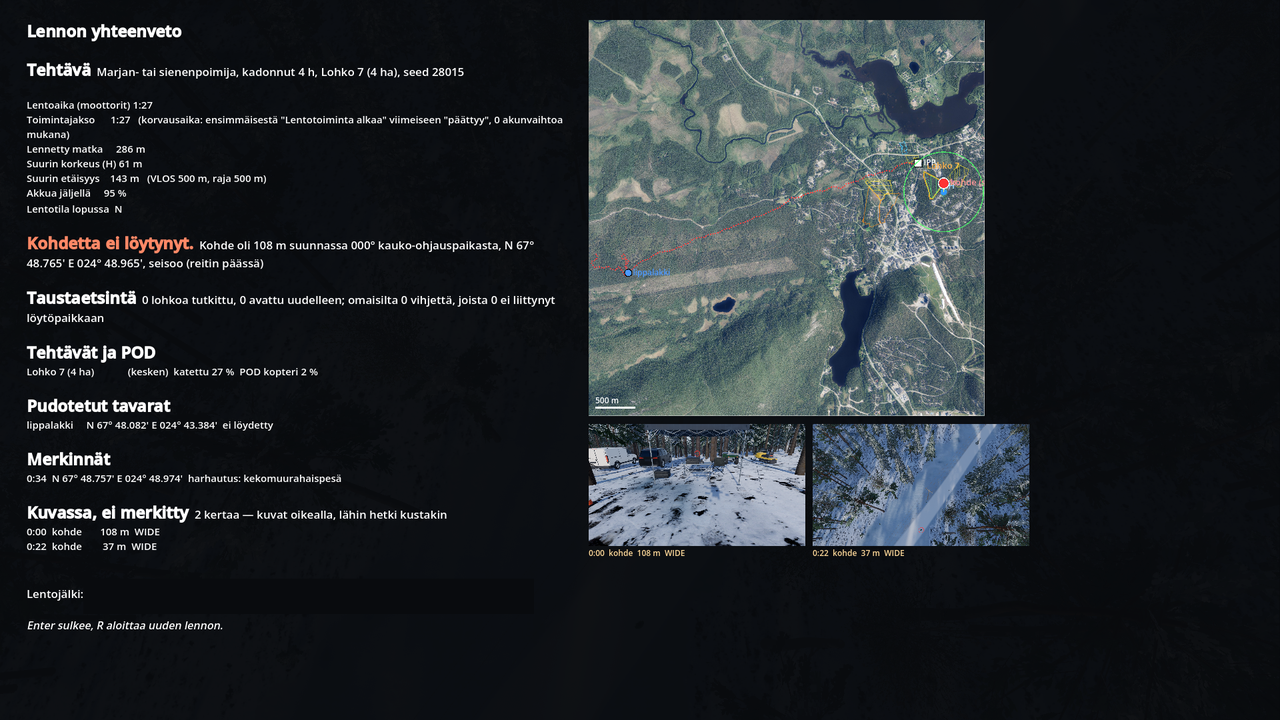
The summary is a debrief, not a score: flight times, distance, heights, whether the person was found and when, marks and finds with their coordinates. On the right is a map showing the truth: the search leader's segment, the IPP, the launch site and the VLOS circle, the route flown (yellow), the missing person's route (red dashed line), the missing person's position (red dot) and the dropped items (blue = not found, green = found).
Below the map are the "in the picture, not marked" images: frames the game renders itself from the moments when the missing person or an item was in the camera picture (wide, zoom or thermal camera, depending on what the pilot was looking at) but was not marked — a red ring shows where it was. The same images are saved next to the flight track (…-kuvassa-N.png). Being in the picture means: inside the camera's field of view, at a distance of at most about 110 m with the wide camera, 180 m with the thermal camera, more with the zoom, not behind terrain and not under dense canopy. On a summer day a person close to ambient temperature can be in the thermal camera picture and still practically invisible — that is exactly what is looked at together in the debrief.
Find procedure (phase 4a)
When a mark hits the person, the crew's procedure appears on the right edge of the HUD and is ticked off as you carry it out: stop the aircraft, C mode (F1), descend below 30 m, identify with zoom, mark, report to the leader (I). The report is logged in the GPX and the debrief tells what state the aircraft was in at the moment of marking (speed, flight mode, height, camera, distance) and how many seconds it took to report. No points — it is a basis for discussion. At the moment of the find the missing person is in the scenario's state: lying, sitting or standing.