2. Controls: keyboard, gamepad, TX16S
Translated from the Finnish manual (manual/fi); the Finnish text is authoritative.
Matches version: 0.1-dev (phase 1, 2026-10-26). Status: works in the development version, no calibration screen yet.
From phase 7 on, every key and axis can be changed on the main menu's Controls page (chapter 18); the defaults are listed below. The menus can also be used with a gamepad or the radio; for that, add CH8 = SH (OK) and CH9 = SG (back) to the radio's SIM model.
The simulator reads three controller sources at the same time. Whichever source has its stick deflected further is in control: you can fly with the radio and press function keys on the keyboard. The stick layout is Mode 2: left stick throttle and rudder (yaw), right stick elevator and aileron (pitch and roll), as on enterprise drone controllers by default.
Keyboard
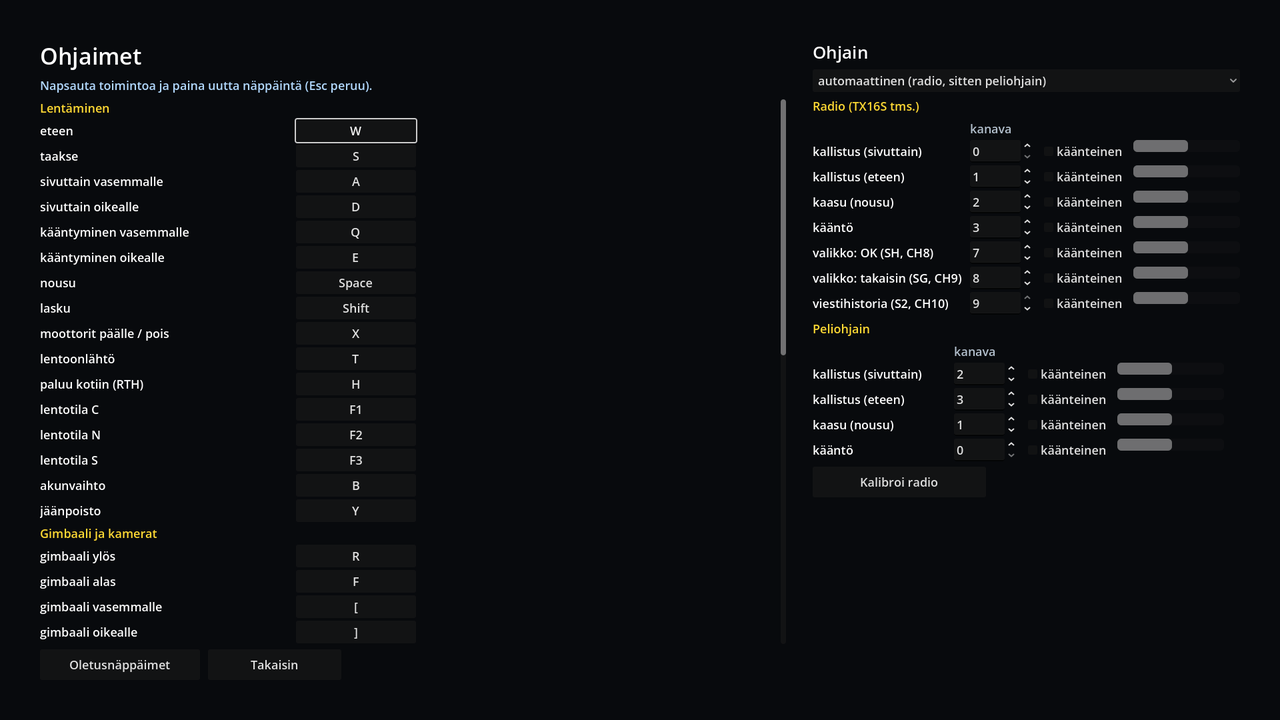
Meant for quick testing and for machines without a gamepad. The arrow keys and the numeric keypad are not used, because on laptops they are often behind the Fn key or missing.
| Key | Function |
|---|---|
| W / S | right stick forward / back (fly the way the nose points / backwards) |
| A / D | right stick left / right (sideways movement) |
| Q / E | turn left / right (yaw) |
| Space / left Shift | climb / descend (throttle) |
| R / F | gimbal up / down |
| [ / ] | gimbal left / right (±90° from the airframe); the turret clock on the HUD shows the direction |
| Z / C | zoom in / out (in the zoom camera, key 2); full deflection doubles the magnification per second |
| X | motors on / off ("Flight operations start" / "end"); the first start sets the home point |
| T | automatic take-off to a hover at about 1.2 m |
| H | return to home (RTH) on / cancel |
| B | battery change: on the ground at the launch site, motors off; takes 75 s of mission clock, after which the battery is full and the next flight can start |
| Y | de-icing: same conditions as a battery change; one minute of cleaning, after which the propellers carry anti-icing compound that prevents new ice for 30 min. Can be done alongside a battery change or in advance |
| Enter | mark the point under the crosshair (LRF point): a blue diamond stays in place in the picture and on the map, the coordinates go to the log and the GPX in DDM format |
| I | report the marked person or the finds to the search leader (chapter 9); logged in the GPX and the debrief with the delay |
| U | report the task searched: coverage and POD are recorded, the search leader gives the next segment |
| M / Shift+M | search method (chapter 8) |
| G | gimbal straight down (−90°) / back to −20° |
| K | stick calibration (radio or gamepad); the simulation pauses meanwhile |
| J | switch controller: radio → gamepad → keyboard only (when several are connected) |
| F1 / F2 / F3 | flight mode C / N / S |
| V | camera view: FPV ↔ chase camera (development aid) |
| N | terrain classes in colour over the terrain (development aid, only in terrain packages that contain terrain data) |
| Esc | menu: the flight and the clock stop, the key guide is shown; Esc / Enter resumes the flight, Q ends the flight and shows a summary (the flight track is saved as GPX) |
A key does not jump to full deflection: while pressed, the stick "slides" to full in about a third of a second and returns to centre slightly faster. This makes flying with the keyboard feel like a stick rather than a switch.
RadioMaster TX16S (EdgeTX, USB joystick mode)
Connect the radio over USB and choose USB Joystick (HID) on the radio. Windows and the simulator see it as "OpenTX Radiomaster TX16S Joystick". The radio needs no driver and no calibration in Windows.
The most important thing: the axes are the selected model's channels in channel order. The simulator's default is AETR order, where
| Channel | Axis | Stick | In the simulator |
|---|---|---|---|
| CH1 Ail | 0 | right stick horizontal | roll |
| CH2 Ele | 1 | right stick vertical | pitch |
| CH3 Thr | 2 | left stick vertical | throttle (climb / descend) |
| CH4 Rud | 3 | left stick horizontal | yaw |
| CH5 | 4 | two-position switch | motors on / off |
| CH6 | 5 | three-position switch | flight mode C / N / S |
| CH7 | 6 | pot S1 | zoom 4.7× … 16.9× (left end 4.7×) |
CH7 is added to the radio's SIM model in the mixer: source S1, channel 7. If it is missing, zoom works with the keyboard keys Z / C; the pot only has an effect when it is turned, so both can be used on the same flight.
If the model has a different order or Mode 1, press K during the flight: the calibration asks you to push the sticks one at a time (right forward, right to the right, left up, left to the right, motor switch, flight mode switch, zoom pot), learns the axis and direction for each and saves them on the machine (user://input_map.json). Enter skips a step the model does not have (the earlier setting stays in force), Esc cancels, Enter closes the finished calibration. Without calibration the default is the AETR order above.
Throttle stick in the centre holds altitude; up climbs, down descends. On the ground with the motors running, raising the throttle past halfway lifts the aircraft into the air.
Gamepad (Xbox, DualSense)
Read through Godot's SDL mapping in a Mode 2 layout: left stick throttle and yaw, right stick pitch and roll, triggers gimbal (right up, left down). A Sony DualSense is recognised as "DualSense Wireless Controller" and works with the same mapping. If a radio is connected at the same time, it is the default controller; J switches to the gamepad.
Stick feel
The sticks have a 3 % dead zone and, as on common drone controllers, expo (0.3): small movements around the centre are fine, full deflection gives full speed. With the sticks centred the aircraft brakes and holds its position (GPS hold), not just zero speed. Below 3 m altitude the descent is limited to 1 m/s.
Known gaps in this version
- RTH or camera switching cannot yet be assigned to the radio's switches.
- Expo and dead zone are not adjustable.