3. Screen and HUD
Translated from the Finnish manual (manual/fi); the Finnish text is authoritative.
Matches version: 0.1-dev (phase 1, 2026-10-26). Status: works; the layout follows the common conventions of enterprise drone apps without imitating any of them.
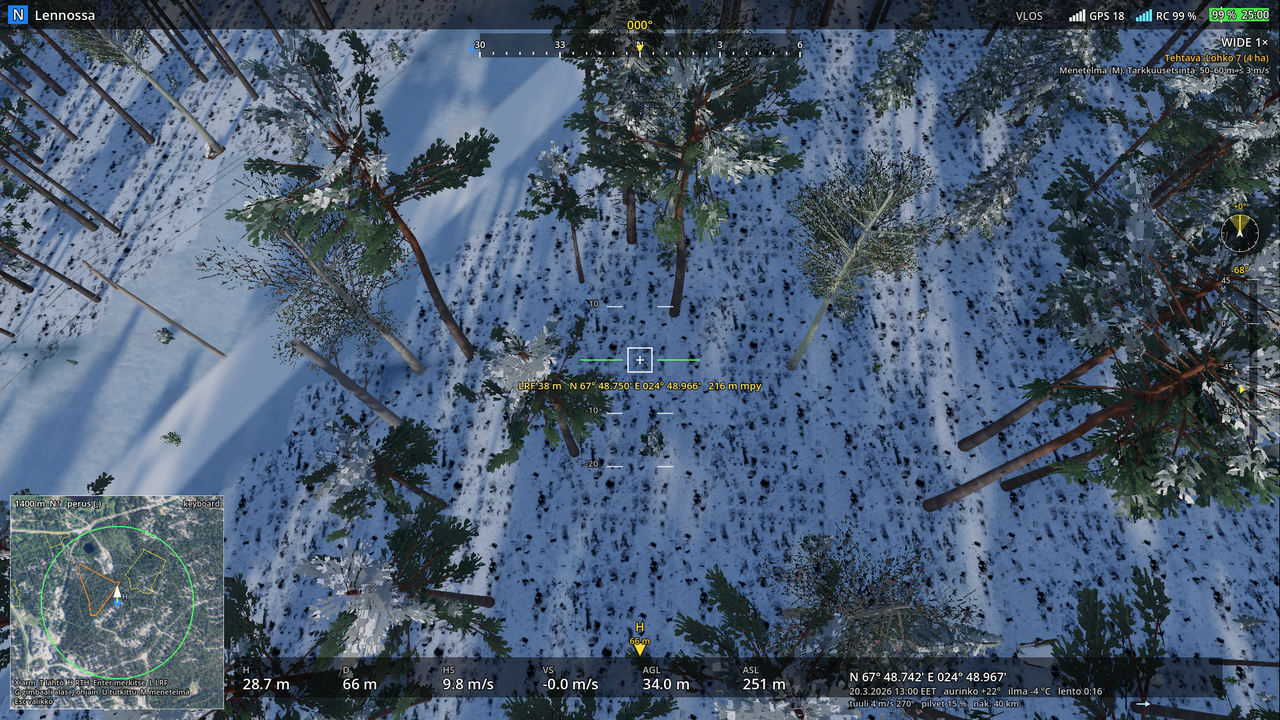
Top bar
- Flight mode indicator on the left: blue N, orange S, green C. Next to it the state: Motors off, Ready for take-off, Flying, Flying (GPS) when the sticks are centred and the aircraft holds its position, Returning home.
- Warning in the middle in red: NO LINE OF SIGHT when the aircraft is outside the VLOS circle, MAXIMUM DISTANCE and MAXIMUM ALTITUDE at the limit, BATTERY LOW, RETURN at 20 % and BATTERY CRITICAL, LAND at 10 %.
- On the right: flight rule (VLOS / E-VLOS / BVLOS), GPS satellites, RC link, battery as a bar and percentage, and the remaining flight time. The white line on the bar is the RTH warning threshold.
Heading tape
Top centre: ±60° from the aircraft's nose, N/E/S/W and tens of degrees; the yellow number is the exact heading. The blue triangle shows the direction to the home point; an arrow at the edge of the tape means the home point is off the tape on that side.
Crosshair, LRF and attitude indicator
Marked points (Enter) are shown as blue diamonds in place on the ground, numbered (K1, K2, …) with their distance; outside the picture they are pointed to with a blue edge arrow, like the home point. A mark that hit the person is red. The same points are shown on the map.
In the middle of the screen is the crosshair box: Enter marks the ground point under it. Below the box is the yellow LRF reading: the laser rangefinder's distance, the point's coordinates in DDM format and its height above sea level (L hides it). The green line is the horizon; the ±10° and ±20° lines move with the aircraft's roll. The aircraft's own roll is small in the gimbal-stabilised picture, so the lines move only a little.
Telemetry (bottom edge)
| Abbreviation | Meaning |
|---|---|
| H | height above the take-off point (as in common drone apps) |
| D | horizontal distance from the home point |
| HS | horizontal speed m/s |
| VS | vertical speed m/s, + up |
| AGL | height above the ground under the aircraft |
| ASL | height above sea level (N2000) |
On the right, the aircraft's position in degrees and decimal minutes (WGS84), the same format used by helicopters, the emergency response centre and the authorities' command and control systems. Below it the scenario date and time in Finnish time, the sun's elevation, the air temperature, any fast-forward, and the flight time.
Turret clock
Above the gimbal scale is a small turret clock: 12 o'clock is the aircraft's nose; the yellow hand and the bright sector show which way the gimbal camera is looking relative to the aircraft and how wide its field of view is (narrow when zoomed, wide on the wide camera). The reading is the gimbal's yaw in degrees (+ to the right). When the pilot flies on the flight camera and the observer turns the gimbal, the clock tells the pilot where the observer is looking.
Gimbal and camera
On the right edge, a vertical scale +45° … −120° and a yellow arrow for the gimbal angle; the reading is above it. In the top right corner the camera name and state: WIDE 1×, ZOOM 8.0× or IR 640 with its palette (chapter 5).
Map (bottom left corner)
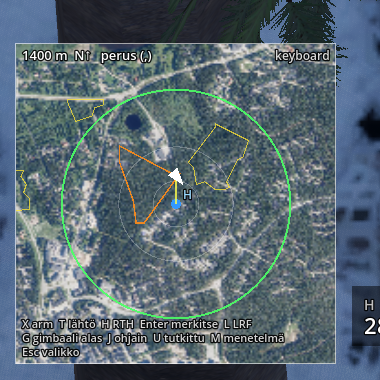
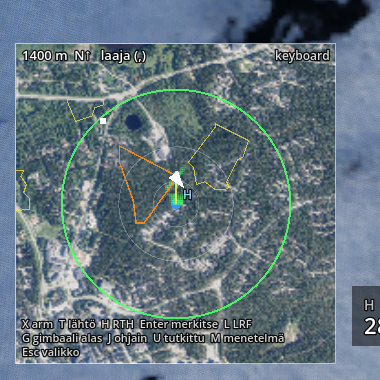
North up, 1400 m wide, orthophoto. The map has two levels, switched with the comma (,); the choice is remembered, and the map header says basic or extended.
Basic (the default for the pilot and the observer): H and the blue dot = launch site, white arrow = the aircraft and its heading, yellow line = the flight track of the whole mission (kept across battery changes), green circle = VLOS 500 m, orange ring = maximum distance if different, grey rings at 100 and 250 m, orange outline = the current task's segment (it changes when a segment is reported searched), and the points marked with the laser (Enter) as diamonds (red = the person, blue = another mark).
The basic level also shows the state of the search by segment, as the radio tells it: green fill = searched, yellow outline = a team working, magenta outline = reopened by the search management.
Extended adds: search coverage (green squares, brighter = higher POD), the IPP (white square), ground teams and dog parties, and a found person as a red dot. The instructor station and coach mode open the map extended.
At the bottom of the map are key hints and the controller in use.
Messages
Top centre, fading out in six seconds: announcements (Flight operations start, Take-off, Landing, Flight operations end), marks with their coordinates, PERSON FOUND in green.