12. Debrief and flight report
Matches version: 0.9.1 (2026-10-29). Status: works.
When a flight ends (End the flight and show the summary in the Esc menu, Q, or the end of a replay in coach mode), the simulator closes the flight view and shows the debrief: the map on the left, the flight summary in the middle and, on the right, pictures of the moments when the person or a dropped item was in view but not marked. The truth is revealed only here: during the flight you cannot see where the missing person really was.
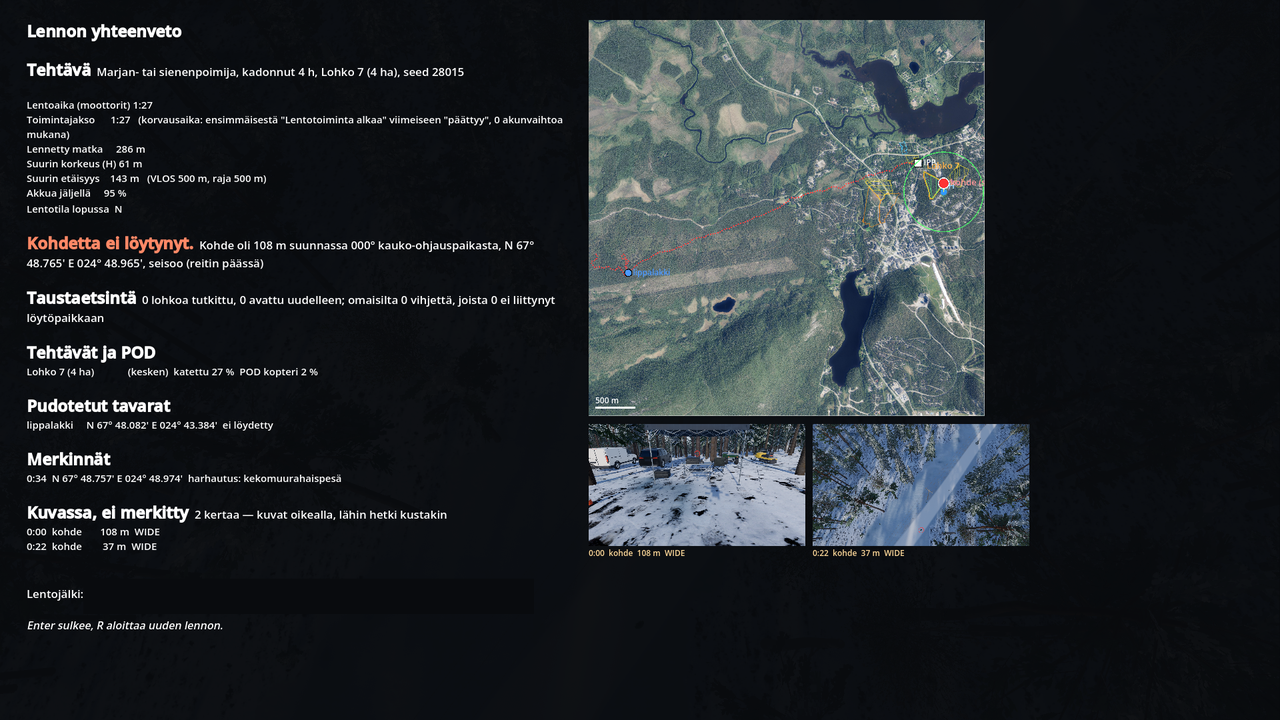
Map
Over the orthophoto:
- the search leader's segment and the other segments,
- the IPP (initial planning point) and the launch site with its VLOS circle,
- the track you flew,
- your own marks (Enter at the crosshair point),
- the truth: the missing person's route, the rest position and the dropped items (found ones in green).
Summary
From the top:
| Part | What it tells |
|---|---|
| Task | the profile (e.g. dementia, berry picker), hours missing, the segment and its area, the seed (the same seed gives the same situation again) |
| Flight time, operating period | motors running in total; the operating period from the first "Flight operations start" to the last "Flight operations end", battery changes included (the basis for compensation) |
| Distance, height, range | distance flown, highest height above take-off (H), greatest distance, the VLOS radius and the distance limit |
| Battery, flight mode | battery left at the end and the flight mode (C / N / S) |
| Person found / not found | the time from take-off and the coordinates; if not found, where the person was (distance and bearing from the launch site, state and kind of rest place) |
| Dog party / ground team found | when a dog or a ground team found the person first or as well; both are credited |
| Background search | segments searched, segments reopened, tips from the relatives (and how many were unrelated to the find location) |
| Base transfers, flights | transfer times and how; each flight's clock times and motor time |
| Tasks and POD | for each task: coverage, number of sweeps, probability of detection (drone, teams, combined), mean height and speed against the method's guide values and the thermal camera's share of the time; "← the person was here" marks the right segment. A recheck combines the first and second pass POD |
| Find procedure | speed, flight mode, height, camera and zoom and distance at the moment of marking; how soon you reported the find to the leader (key I) |
| Dropped items | every item with its coordinates: found or not, and whether a dog found it |
| Marks | every mark with time and coordinates: the person, a find, a distractor (e.g. an anthill or a boulder in the thermal picture) or nothing |
| In view, not marked | how many times the person or an item was in view without a mark, and for each the closest moment: time, distance and camera |
At most six missed moments are rendered as pictures (the person first). Under each picture are the time, the target, the distance and the camera, and the canopy cover in per cent when the target was under the crowns.
Keys
- Enter or Esc (on a controller A / OK or B / Back) closes the debrief and returns to the menu.
- R starts a new flight with the same settings.
Files
Every flight leaves:
| File | Where | For |
|---|---|---|
flight-<time>.gpx | Documents\Support UAS\lennot (Linux: ~/Documents/Support UAS/lennot) | the track for a map program |
flight-<time>.scenario.json | the same folder | the truth of the situation: the person's route, items, tips |
flight-<time>-kuvassa-N.png | the same folder | the missed moments as pictures |
flight-<time>.json, .meta.json | the application folder, logs (see chapter 16) | 10 Hz samples and details for the coach-mode replay |
Coach mode (chapter 13) replays a flight from its .meta.json file: the whole flight again, the map, the camera footprint and the POD recomputed.