6. Launch site and VLOS / E-VLOS / BVLOS
Translated from the Finnish manual (manual/fi); the Finnish text is authoritative.
Matches version: 0.3-dev (phase 3, 2026-10-26). Status: works in VLOS mode; E-VLOS and BVLOS exist as parameters, but there is no choice for them in the user interface yet. New: land-cover map and legend (M).
Choosing the launch site
The game starts on the planning map: the orthophoto of the whole terrain package, with a 1 km scale bar. In terrain packages that have land-cover data, a click sets the IPP (last seen point; it snaps to the nearest road, path or yard) and the scenario is drawn around it: the segment given by the search leader (orange), and the launch site places itself next to the segment on a road or yard, just as the crew really drives as close as it can get (blue dot, green VLOS circle). The top edge shows the launch site's coordinates (DDM) and ground height. In old packages without land-cover data a click sets the launch site directly. Enter (or Space) starts the flight: the aircraft is on the ground at the site, and the home point is set when the motors start.
Scenario (phase 4a)
On the left side is the mission: the missing person's profile, clothing, time and place last seen, a direction hint, phone, alert time from OHTO and the crew's arrival time, the segment given by the search leader. The hints are in the authorities' style and deliberately incomplete: the clothing is correct, the direction about two times out of three. Keys: P changes the profile (berry or mushroom picker, person with dementia, hiker / skier depending on snow, child 7–12, …), H / Shift+H adds or subtracts an hour of missing time, R draws a new scenario (the seed is shown in the text; the same seed with the same package and IPP gives the same scenario, also on another computer), G switches the GPS interference drill on or off (chapter 4). During the flight the mission is shown in the Esc menu.
The missing person has walked from the IPP in the direction their profile suggests across the real terrain (paths and roads attract, bogs and water slow down or block), dropped items along the way and stopped to rest on the route, in vegetation or at the end of the route. In winter the route shows in the snow as a trail. The segment contains the missing person most of the time, not always — as in reality.
In real operations the site is chosen in the open, without edge obstacles in the search direction, near the car, where it can be cordoned off. The simulator does not yet assess the quality of the site; choose it as you would in reality.
Land-cover map (M)
M switches between the aerial photo and the land-cover map. The classes come from the National Land Survey of Finland (NLS) topographic database and the Natural Resources Institute Finland (Luonnonvarakeskus) forest resource maps (2 m grid, 16 m forest data): conifer, deciduous and mixed forest, sparse forest / fell birch, open forest land, heath, bedrock, boulder field, bogs in four classes (open bog / wooded bog × easy going / hard going, as on the topographic map), paludified land, lake, river, field, meadow, roads by surface, tracks, paths, buildings, yards and power-line corridors. The legend on the right lists the classes in the view from largest to smallest; the line at the top shows the launch site's own land-cover class.
By the topographic database's definition, a hard-going bog is "very difficult, dangerous or impossible to cross"; an easy-going one can be crossed anywhere. This is the same information the search leader reads from the topographic map when drawing segments (chapter 9).
In old terrain packages without land-cover data, M does nothing.
VLOS 500 m as a circle
The simulator does not compute line of sight through terrain and trees (decision ADR 0008): the aircraft is considered visible within 500 m of the launch site; outside that, the HUD shows the red NO LINE OF SIGHT warning and the flight is flagged in the summary. Control still works, just as in reality the link reaches further than the eye. The maximum distance is the same 500 m by default, so in a normal flight the limit stops the aircraft before the warning.
The radius is a scenario parameter: the instructor can reduce it in fog or twilight.
E-VLOS and BVLOS
- E-VLOS: a larger circle, assumes an observer posted forward (OPS M1-35).
- BVLOS: no line-of-sight circle; the limits are the link range, the battery and the maximum altitude. Intended for future permits; the HUD shows the link quality dropping with distance.
The choice comes to the planning map in the next version; for now the mode is VLOS.
The base on the ground
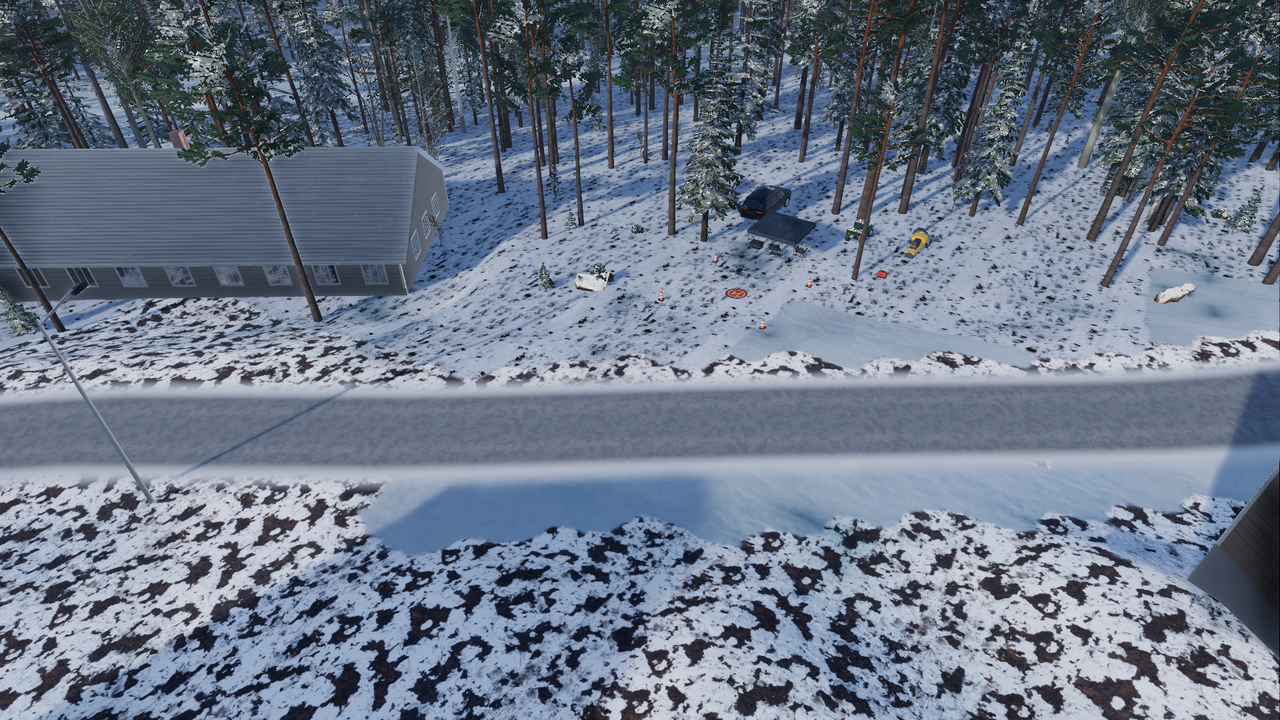
The launch site has a light base: a folding table with the battery case, a generator charging the batteries (off to the side because of the noise), four traffic cones at the corners of the take-off area, the landing pad (orange circle, white ring and white H) under the aircraft, and the car and the season's off-road vehicle: a snowmobile in winter, a quad in summer. In the thermal camera the running generator, the charging batteries and the vehicles just driven show warm; the table and the cones read at air temperature. The base is always set up beside buildings, never on them.
Moving the base (phase 9)
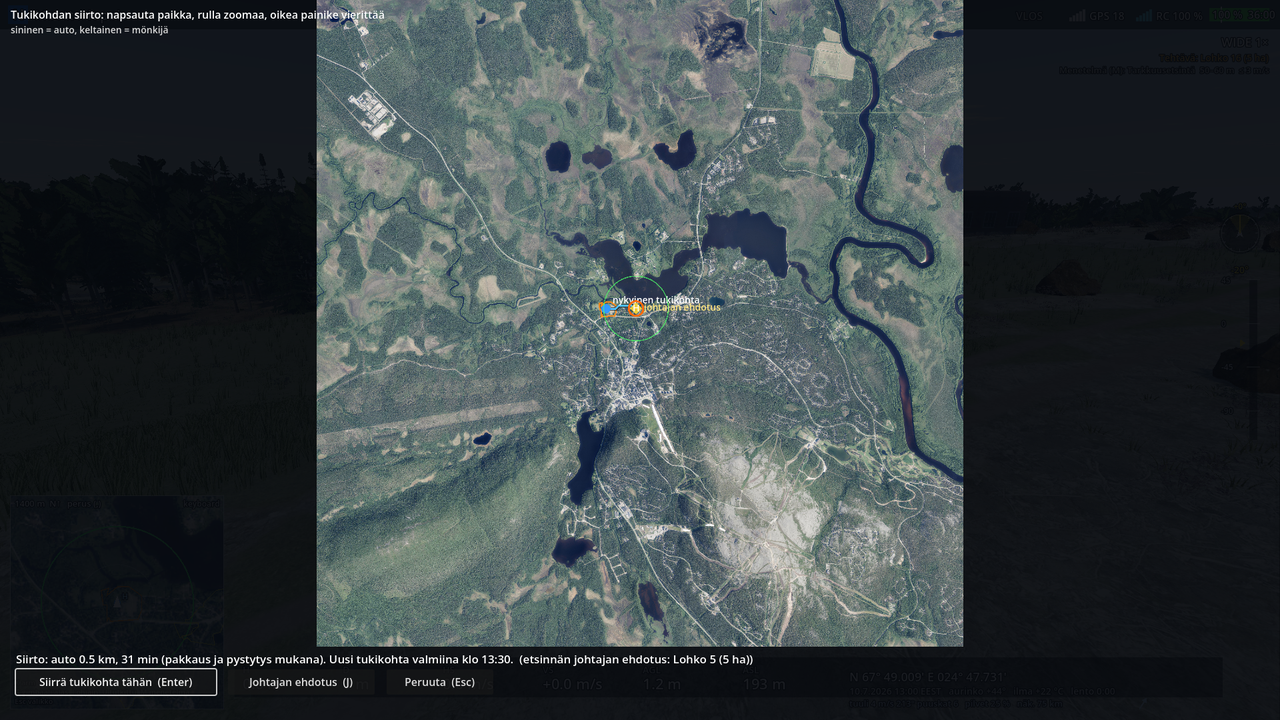
When the search moves further away, the pilot decides on moving the base. The Esc menu has Move the base… (T) when the aircraft is on the ground at the base, the motors are off and no battery change or de-icing is under way. The map shows:
- the current base (blue dot) and the current task's segment (orange)
- the search leader's suggestion (yellow diamond): a road, path or yard beside the current segment, or beside the next segment if the base already serves the current one
- the chosen place (orange ring, H) with VLOS 500 m around it.
The suggestion is selected to begin with, so Enter (or the radio's OK / the pad's A) moves there. A click chooses any other place; the wheel zooms and the right button pans, J goes back to the suggestion and Esc cancels. Before confirming, the route and the time show: the blue part by car, the yellow part by snowmobile or quad, and the time of day when the new base is ready.
The route is computed from the land cover on a 50 m grid as the quickest drive:
| Car | Snowmobile (winter) | Quad (summer) | |
|---|---|---|---|
| Paved road | 60 km/h | 30 km/h | 35 km/h |
| Gravel road | 40 km/h | 35 km/h | 35 km/h |
| Track | 20 km/h | 35 km/h | 25 km/h |
| Yard | 15 km/h | 10 km/h | 8 km/h |
| Path, field, meadow | – | 30–35 km/h | 12–15 km/h |
| Forest | – | 12–20 km/h | 6–8 km/h |
| Bog | – | 10–30 km/h | 4 km/h (easy to cross) |
| Frozen lake | – | 40 km/h | – |
The car stays on roads, tracks and yards. The off-road vehicle is unloaded from the trailer where the car stops (3 min). Open water is not crossed; in winter the snowmobile drives over the ice. Packing up 15 min and setting up 15 min are added to the time.
During the transfer the picture fades to black. The search goes on at high speed for the transfer time (300×): ground teams and dog parties move, the weather and the snow move on, and the radio traffic shows on the black screen so nothing is missed. On arrival the picture comes back at the new base: the aircraft is on the pad, and the home point and the launch site are at the new place. The motors cannot be started and time cannot be sped up during the transfer.
The observer travels with the crew and sees the same fade; the instructor station follows the situation as usual. Transfers are listed in the summary (departure, ready, route), and in coach-mode replay the base moves at the right time.
The suggestion does not judge the place for flying (edge obstacles, the view towards the search); choose the place as you would for real.